Summary
On a hunt group configured for Simultaneous Ring (SimRing), a member who is already on an active call may not be rung when a new call arrives at the group — even though their phone supports call waiting. This article explains why this happens and how to restore ringing to members who are on a call.
Symptoms
- A new call into a SimRing hunt group rings the available members but skips any member who is currently on another call.
- The busy member sees no incoming call indication on their phone for the group call.
- Direct calls to that member still show a call-waiting indication normally — only the hunt group call is not offered.
- The behavior may appear suddenly on a group that previously rang busy members, typically after the hunt group was edited or saved in the portal.
Cause
A SimRing hunt group offers an incoming call only to members whose presence status is not "On the Phone." Whether a member reports "On the Phone" while on a call is controlled by a per-member setting called "On the Phone Presence."
When a hunt group is created or saved in the portal, the "On the Phone Presence" setting is automatically turned on for every member of that group. Once it is on, a member who is on a call reports as "On the Phone," and the platform does not offer them the group call until they hang up.
This is independent of call waiting. Call waiting governs direct calls to the member; SimRing hunt group delivery is decided by presence, so a busy member can still be skipped by the group even with call waiting enabled.
Resolution
For members of a hunt group, the end-user portal does not let you switch "On the Phone Presence" off. If you try, the portal does not save the change. Kandy Support makes this change on the platform for you.
To restore ringing to members who are already on a call, contact Kandy Support and ask them to switch "On the Phone Presence" off for the affected hunt group members. Include this information in your request:
- The company (SMB) name or domain of the affected users.
- The name or pilot number of the hunt group.
- The members who must ring while they are on a call: their names and their phone numbers or extensions. If this applies to all members of the group, write "all members".
Kandy Support tells you when the change is complete. After that, SimRing hunt group calls ring these members even while they are on another call.
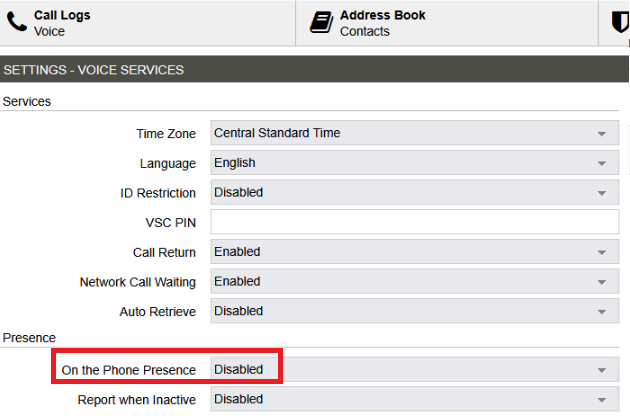
To check the current value for a member, sign in to the end-user portal as that member, go to Account → Settings – Voice Services, and look at "On the Phone Presence" under Presence. Disabled means that the member is rung while on a call.
Important to know
- Any later edit to the hunt group re-enables it. Any time the hunt group is saved in the portal — for example, adding or removing a member, or changing ring/timeout values — "On the Phone Presence" is turned back on for every member of that group, and the original behavior returns. After any such change to the group, contact Kandy Support again so that they switch the setting off again for the affected members. To prevent repeated requests, make all the changes to the group first, and then send one request.
- Presence visibility trade-off. With "On the Phone Presence" switched off, those members no longer publish an "On the Phone" status to colleagues who monitor their presence (for example, the presence display on desk phones, in Kandy apps, or in attendant consoles). Call handling is otherwise unchanged.
A product enhancement to make this presence behavior optional (so it is no longer re-enabled automatically each time a hunt group is saved) has been submitted to our product team for consideration in a future release.
Andres Canclini
Comments